![Bedrock_Learning_Logo_Mark_Reverse_RGB_1920px@72ppi.png]](https://help.bedrocklearning.org/hs-fs/hubfs/Bedrock_Learning_Logo_Mark_Reverse_RGB_1920px@72ppi.png?height=50&name=Bedrock_Learning_Logo_Mark_Reverse_RGB_1920px@72ppi.png)
TIP: You can read more about sequencing here.
Sequencing in Mapper allows teachers to sequence the subject-specific vocabulary ahead of time to coincide with classroom teaching and align with curriculum plans. Teachers can change the order of the words within each class so that the teaching is personalised for their students.
Example: all Year 10 may learn the exact words in Geography. However, they may be learned in a different order.
How to sequence Tier 3 vocabulary in Bedrock Mapper
- Teachers can set a start date and an (optional) end date to align vocabulary teaching with classroom practice. Words must also be ready to teach and made active to be sequenced.
- The classes and sequencing tab on Mapper shows whether sequencing for each class is complete.
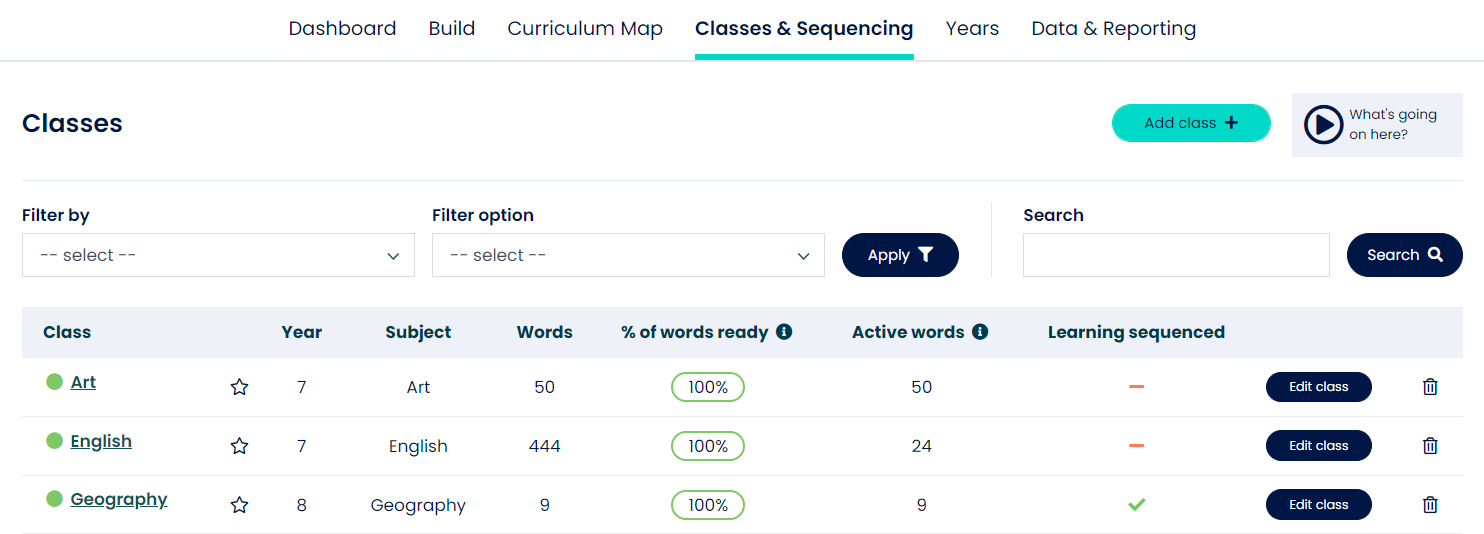
- A green tick indicates that sequencing is complete and that all vocabulary has at least a start date attributed to it.
- An orange dash indicates that sequencing is partially complete - some vocabulary has at least a start date attributed to it.
- A red cross indicates that sequencing still needs to be completed.
Curriculum sequencing can be copied to multiple classes to save teachers' time.
For example, a school may have one teacher in charge of the Year 7 Mapper curriculum for history. That teacher could set up the curriculum for one class and copy it for all other history classes in Year 7. Teachers can still make changes to individual classes. However, the bulk of the work will be done for them.
Teachers can "add to curriculum sequencing" or "replace curriculum sequencing."
Add to current curriculum sequencing
- Adds sequenced content to a class
- Any words that already exist in a class are not transferred and are left as they are
- This is useful for schools that wish to combine sequencing from two classes into one.
- This can be done for one class or any number of classes.
- This can be done between year groups and subjects.
Replace current curriculum sequencing
- All words and sequencing currently within the class(es) are deleted and replaced.
- This can be done for one class or any number of classes.
- This can be done between year groups and subjects.
If you have any questions about sequencing, or would like some specific support for your own school's Tier 3 objectives, contact your school's account manager or our support team at support@bedrocklearning.org.