![Bedrock_Learning_Logo_Mark_Reverse_RGB_1920px@72ppi.png]](https://help.bedrocklearning.org/hs-fs/hubfs/Bedrock_Learning_Logo_Mark_Reverse_RGB_1920px@72ppi.png?height=50&name=Bedrock_Learning_Logo_Mark_Reverse_RGB_1920px@72ppi.png)
Whether your school's MIS is connected to Bedrock with Wonde, or you are updating your records manually, the lead teacher(s) within your school can change/add teachers to a class. This means that teachers are able to view the class reports within the teacher dashboard and will receive the emailed reports for the class.
To add or update teachers linked to a class:
1. Click on the class in the ‘class database’
2. Click on ‘manage’
3. Click on the arrow next to ‘teachers’
4. Click on the ‘search’ box and type in the teacher's name OR find the teacher in the list
Note
Teachers appear when they have been added to the Bedrock system either via Wonde or manual upload.
5. Click ‘add’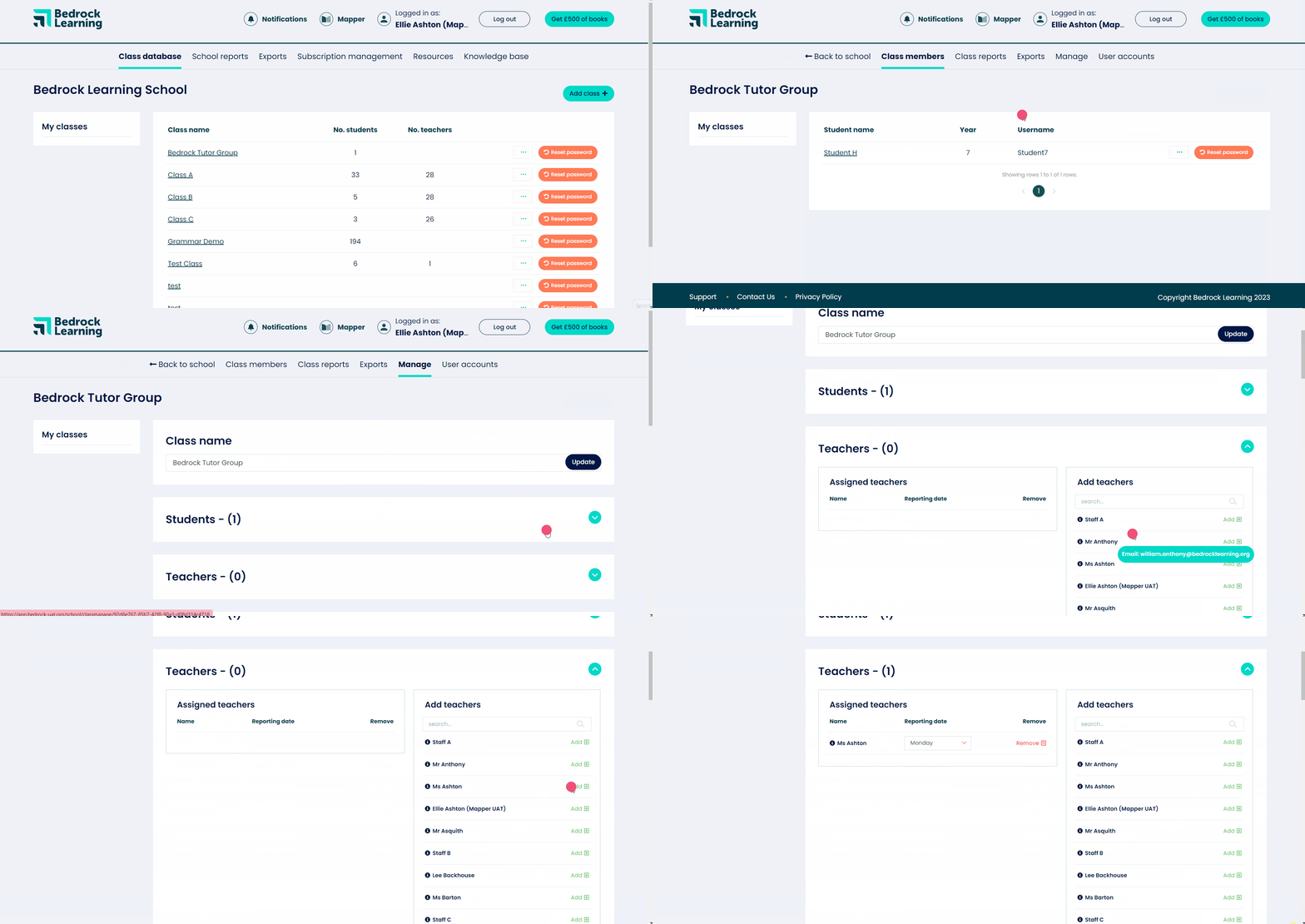
Remember
Teachers assigned to classes can change the day they wish to receive their emailed report.